<?xml version="1.0" encoding="utf-8"?>
<feed xmlns="http://www.w3.org/2005/Atom" xmlns:media="http://search.yahoo.com/mrss/" xml:lang="en-US">
  <title>BigBinary Blog: Next.js</title>
  <subtitle>Deep technical writing on Ruby on Rails, performance, scaling, monitoring and engineering.</subtitle>
  <link rel="self" type="application/atom+xml" href="https://www.bigbinary.com/blog/categories/next-js/feed.xml"/>
  <link rel="alternate" type="text/html" href="https://www.bigbinary.com/blog/categories/next-js"/>
  <id>https://www.bigbinary.com/blog/categories/next-js</id>
  <updated>2023-11-28T00:00:00.000Z</updated>
  <author>
    <name>BigBinary</name>
    <uri>https://www.bigbinary.com/</uri>
  </author>
  <icon>https://www.bigbinary.com/favicon.ico</icon>
  <logo>https://www.bigbinary.com/images/bigbinary_square_big_logo.png</logo>
  <rights>Copyright 2023 Big Binary LLC</rights>
  <generator uri="https://nextjs.org">Next.js</generator>
  <entry>
      <title type="text"><![CDATA[Serving Next.js assets from a CDN without Vercel]]></title>
      <link rel="alternate" type="text/html" href="https://www.bigbinary.com/blog/serving-nextjs-assets-images-cdn"/>
      <link rel="enclosure" type="image/jpeg" href="https://www.bigbinary.com/blog/images/social_preview_images/serving_assets_and_images_in_nextjs_from_cdn_without_vercel.jpg"/>
      <id>https://www.bigbinary.com/blog/serving-nextjs-assets-images-cdn</id>
      <published>2023-11-28T00:00:00.000Z</published>
      <updated>2023-11-28T00:00:00.000Z</updated>
      <author>
        <name>Akash Srivastava</name>
        <uri>https://www.bigbinary.com/blog/authors/akashdotsrivastava</uri>
      </author>
      <category term="Next.js"/>
      <media:thumbnail url="https://www.bigbinary.com/blog/images/social_preview_images/serving_assets_and_images_in_nextjs_from_cdn_without_vercel.jpg" width="1200" height="627"/>
      <summary type="text"><![CDATA[Serve assets and public images in Next.js app from a CDN without deploying on Vercel]]></summary>
      <content type="html" xml:base="https://www.bigbinary.com/blog/serving-nextjs-assets-images-cdn"><![CDATA[<p><a href="https://neetocourse.com">NeetoCourse</a> allows you to build and sell courses
online. <a href="https://courses.bigbinaryacademy.com/">BigBinary Academy</a> runs on
NeetoCourse. NeetoCourse uses Next.js to build its pages.</p>
<p>If one uses Vercel to deploy a Next.js application, Vercel
<a href="https://nextjs.org/docs/app/building-your-application/deploying#managed-nextjs-with-vercel">automatically configures a global CDN</a>.
However, NeetoCourse is hosted at
<a href="https://neetodeploy.com/neetodeploy">NeetoDeploy</a>, our own app deployment
platform. This meant we had to figure out how to serve assets and images from a
CDN. We like using Cloudflare for various things, and we decided to use
Cloudflare as the CDN for this case.</p>
<p>There are two kinds of files in a server-side rendered Next.js app that can be
served from a CDN.</p>
<ul>
<li>Assets like server-rendered HTML, CSS, JS, and fonts.</li>
<li>Public media like images and videos. These typically reside in the public
folder.</li>
</ul>
<h2>Server rendered assets</h2>
<p>When Next.js is deployed in production, then during the <code>next build</code> step all
server rendered assets are put in <code>.next/static/</code> folder. Next.js provides an
option to set a CDN to serve these assets. This can be done by setting the
<code>assetPrefix</code> property in <code>next.config.js</code>, where <code>ASSET_HOST</code> is an environment
variable that contains the CDN url.</p>
<pre><code class="language-js">/* next.config.js */
...

const assetHost = process.env.ASSET_HOST;

const nextConfig = {
  ...
  assetPrefix: isPresent(assetHost) ? assetHost : undefined,
  ...
};

module.exports = nextConfig;
</code></pre>
<p><a href="https://nextjs.org/docs/app/api-reference/next-config-js/assetPrefix">The official doc</a>
has more details about it.</p>
<h3>Result</h3>
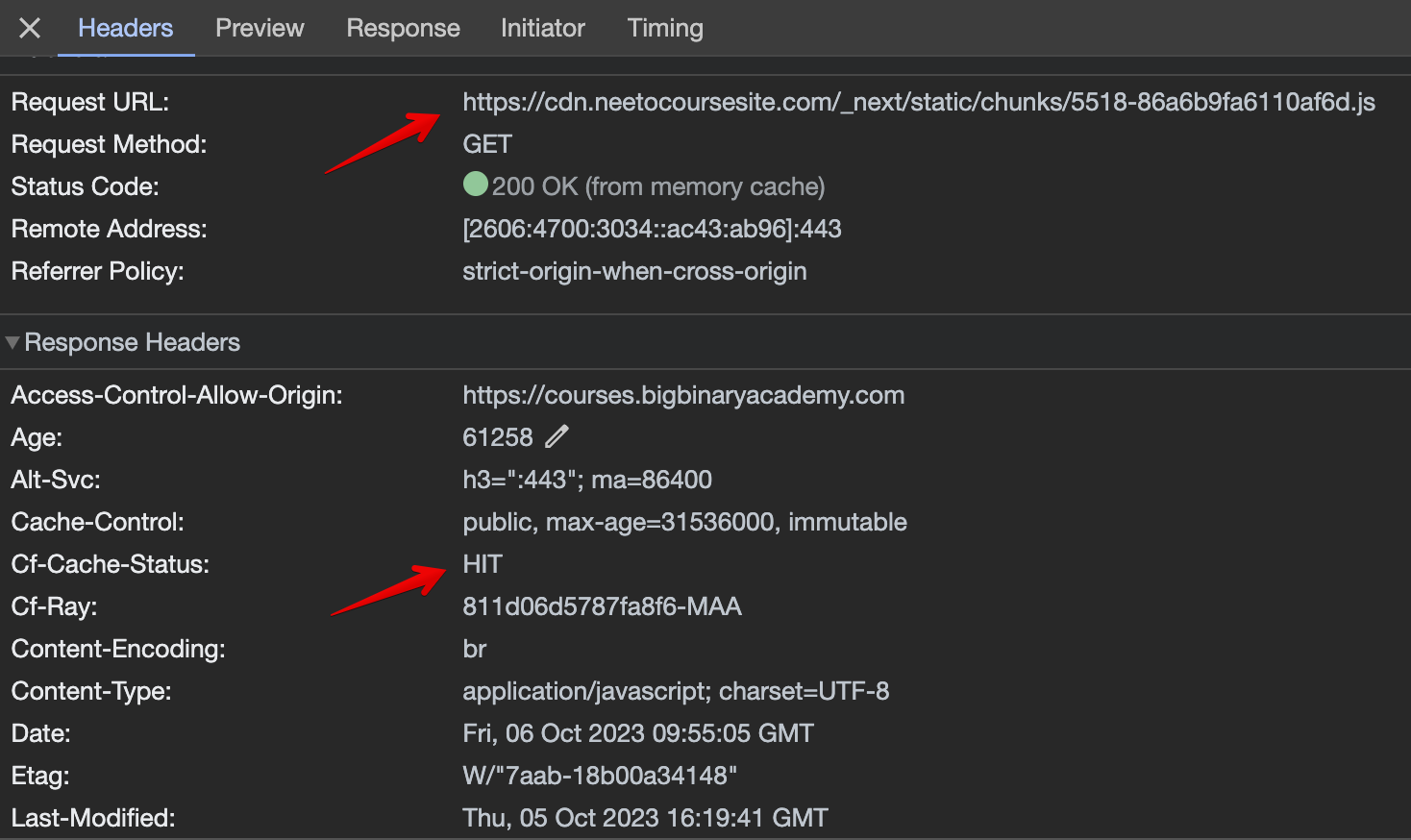
<p>As shown in the pic below, we had a cache hit. It means the assets are being
served from the configured CDN.</p>
<p><img src="https://www.bigbinary.com/blog/images/images_used_in_blog/2023/serving-nextjs-assets-images-cdn/cache-hits-assets.png" alt="Cache HITs on server rendered assets"></p>
<h2>Public media</h2>
<p>Next.js has
<a href="https://nextjs.org/docs/pages/api-reference/components/image"><code>&lt;Image&gt;</code></a>
component that comes with out-of-the-box necessary optimizations. If we could
use <code>&lt;Image&gt;</code> tag then our CDN problem would also be solved. However the
<code>&lt;Image&gt;</code> component
<a href="https://github.com/vercel/next.js/discussions/18739">does not work well with Tailwind CSS</a>,
and we rely heavily on Tailwind CSS.</p>
<p>Therefore, we loaded images from the public folder using the traditional <code>&lt;img&gt;</code>
tag.</p>
<pre><code class="language-jsx">import React from &quot;react&quot;;
import dottedBackground from &quot;public/index-dotted-bg&quot;;

const HeaderImage = () =&gt; (
  &lt;img
    alt=&quot;dotted background&quot;
    className=&quot;m-0 w-20 md:w-40 lg:w-auto&quot;
    src={dottedBackground}
  /&gt;
);
</code></pre>
<p>However now images are not optimized by Next.js and are served from the server
directly. This is because Next.js
<a href="https://nextjs.org/docs/app/api-reference/next-config-js/assetPrefix#:~:text=Files%20in%20the%20public%20folder%3B%20if%20you%20want%20to%20serve%20those%20assets%20over%20a%20CDN%2C%20you%27ll%20have%20to%20introduce%20the%20prefix%20yourself">does not consider</a>
media in public folder as static assets to be sent to CDN.</p>
<h3>Configuring CDN</h3>
<p>Since we had already set up and configured a CDN using Cloudflare, we set up a
util to prefix the source with our asset host if it is present in the app
environment.</p>
<pre><code class="language-js">import { isNotNil } from &quot;ramda&quot;;

export const prefixed = src =&gt;
  src.startsWith(&quot;/&quot;) &amp;&amp; isNotNil(process.env.ASSET_HOST)
    ? `${process.env.ASSET_HOST}${src}`
    : src;
</code></pre>
<p>Now we can use <code>prefixed</code> in the <code>&lt;img&gt;</code> tag.</p>
<pre><code class="language-jsx">import React from &quot;react&quot;;
import { prefixed } from &quot;utils/media&quot;;

const HeaderImage = () =&gt; (
  &lt;img
    alt=&quot;dotted background&quot;
    className=&quot;m-0 w-20 md:w-40 lg:w-auto&quot;
    src={prefixed(&quot;/index-dotted-bg.svg&quot;)}
  /&gt;
);
</code></pre>
<p>We expected that with this configuration, if <code>ASSET_HOST</code> value was set up then
the images would be served from the CDN. Otherwise, they would be served from
the server.</p>
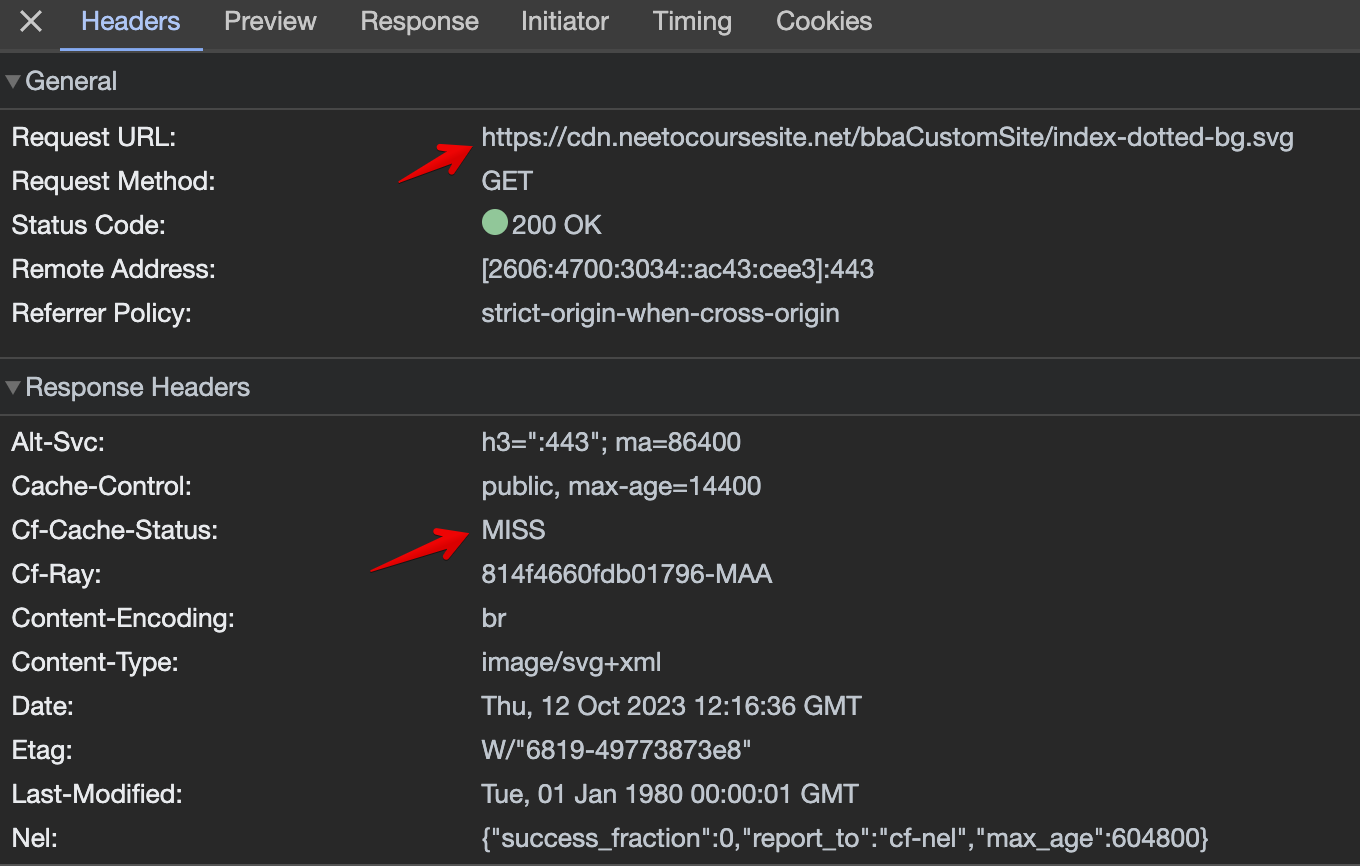
<p>The images did load correctly, but the CDN was not able to cache them. All of
the requests resulted in <strong>cache misses</strong>.</p>
<p><img src="https://www.bigbinary.com/blog/images/images_used_in_blog/2023/serving-nextjs-assets-images-cdn/cache-misses-images.png" alt="Cache MISSes on server rendered images"></p>
<h3>Solution</h3>
<p>The CDN was not able to cache the images because the <code>Cache-Control</code> header was
not set on the images. This header is set by Next.js when the assets are served
from the <code>.next/static/</code> folder, but not when they are served from the <code>public</code>
folder. In such cases, we have to explicitly configure the header to be sent
when a request is made from the CDN.</p>
<p>So, we ended up adding a custom <code>headers</code> block to the <code>next.config.js</code>.</p>
<pre><code class="language-js">/* next.config.js */
...
const nextConfig = {
  ...
  headers: async () =&gt; [
    {
      source: &quot;/:all*(.png|.jpg|.jpeg|.gif|.svg)&quot;,
      headers: [
        {
          key: &quot;Cache-Control&quot;,
          value: &quot;public, max-age=31536000, must-revalidate&quot;,
        },
      ],
    },
  ],
  ...
};

module.exports = nextConfig;
</code></pre>
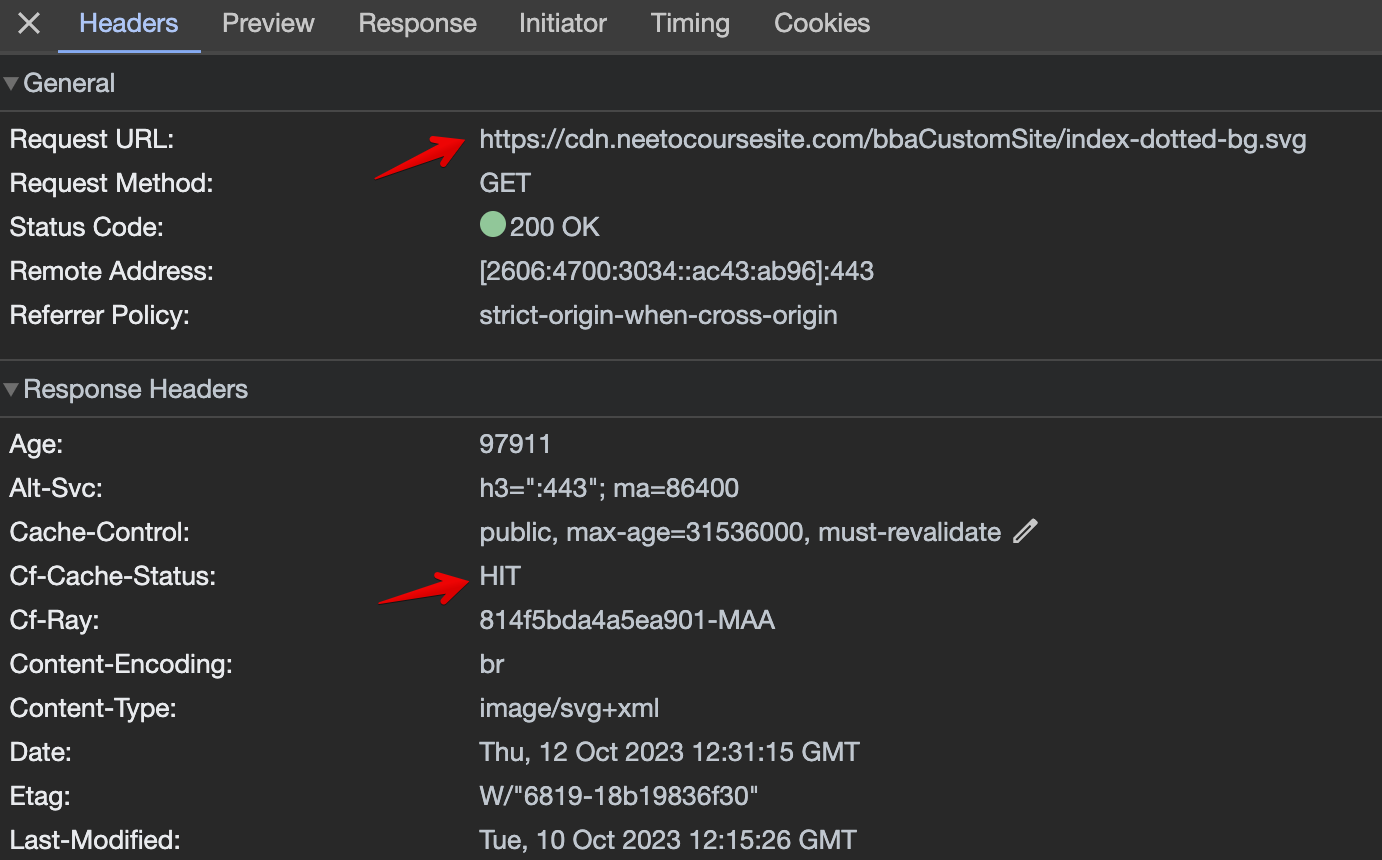
<p>This worked. All subsequent requests from the CDN for public images turned into
<strong>cache hits</strong>.</p>
<h3>Result</h3>
<p><img src="https://www.bigbinary.com/blog/images/images_used_in_blog/2023/serving-nextjs-assets-images-cdn/cache-hits-images.png" alt="Cache HITs on server rendered images"></p>
<h2>Conclusion</h2>
<ul>
<li>Use <code>assetPrefix</code> option in <code>next.config.js</code> to serve server-rendered assets
from a CDN.</li>
<li>Explicitly set <code>Cache-Control</code> header in <code>next.config.js</code> and ensure image src
URLs contain the CDN asset host to serve public images from a CDN.</li>
</ul>
]]></content>
    </entry>
  <entry>
      <title type="text"><![CDATA[Catch 404 urls in Next.js and write them to firebase]]></title>
      <link rel="alternate" type="text/html" href="https://www.bigbinary.com/blog/catch-404-urls-in-nextjs"/>
      <link rel="enclosure" type="image/png" href="https://www.bigbinary.com/blog/images/social_preview_images/generated/catch-404-urls-in-nextjs.png"/>
      <id>https://www.bigbinary.com/blog/catch-404-urls-in-nextjs</id>
      <published>2020-12-23T00:00:00.000Z</published>
      <updated>2020-12-23T00:00:00.000Z</updated>
      <author>
        <name>Piyush Sinha</name>
        <uri>https://www.bigbinary.com/blog/authors/piyushsi</uri>
      </author>
      <category term="Next.js"/>
      <media:thumbnail url="https://www.bigbinary.com/blog/images/social_preview_images/generated/catch-404-urls-in-nextjs.png" width="1200" height="630"/>
      <summary type="text"><![CDATA[We recently jumped on the Jamstack bandwagon and moved our BigBinary website to use next.js. We also migrated BigBinary Blog to using next.js. In the process of migration we knew we might have missed...]]></summary>
      <content type="html" xml:base="https://www.bigbinary.com/blog/catch-404-urls-in-nextjs"><![CDATA[<p>We recently jumped on the <a href="https://www.netlify.com/jamstack/">Jamstack</a>
bandwagon and moved our BigBinary website to use <a href="https://nextjs.org">next.js</a>.
We also migrated <a href="https://bigbinary.com/blog">BigBinary Blog</a> to using next.js.</p>
<p>In the process of migration we knew we might have missed handling a few urls.
We wanted to know all the urls which are resulting in 404 now.</p>
<p>Traditionally, a static site is not able to catch all the 404s.
However with next.js we can capture the urls resulting in 404 and we can write those urls to firebase.</p>
<h3>Setting up Firebase</h3>
<p>Get Started with
<a href="https://console.firebase.google.com/">Firebase</a>
and create an account.
Add a project there and then add a &quot;Web app&quot; inside that project.
After that, you will find web app’s Firebase configuration something like this.</p>
<pre><code class="language-js">var firebaseConfig = {
apiKey: “XXXXXXXXXXXXXXXXXXXXXXXX”,
authDomain: “test-XXXX.firebaseapp.com”,
databaseURL: “https://test-XXXX-default-rtdb.firebaseio.com&quot;,
projectId: “test-XXXX”,
storageBucket: “test-XXX.appspot.com”,
messagingSenderId: “00000000000”,
appId: “1:00000000:web:XXXXX00000XXXXXXX”
};
</code></pre>
<p>Edit rules in Rules section like this.</p>
<pre><code class="language-json">{
  &quot;rules&quot;: {
    &quot;.read&quot;: false,
    &quot;.write&quot;: true
  }
}
</code></pre>
<h3>Creating custom 404</h3>
<p>To create a custom 404 page create a <code>pages/404.js</code> file.
At build time this file is statically generated and would serve as the 404 page for the application.
This page would look like this.</p>
<pre><code class="language-javascript">import { useEffect } from &quot;react&quot;;
import firebase from &quot;firebase&quot;;

export default function Custom404() {
  useEffect(() =&gt; {
    const firebaseConfig = {
    apiKey: “XXXXXXXXXXXXXXXXXXXXXXXX”,
    authDomain: “test-XXXX.firebaseapp.com”,
    databaseURL: “https://test-XXXX-default-rtdb.firebaseio.com&quot;,
    projectId: “test-XXXX”,
    storageBucket: “test-XXX.appspot.com”,
    messagingSenderId: “00000000000”,
    appId: “1:00000000:web:XXXXX00000XXXXXXX”
    }

    firebase.initializeApp(firebaseConfig).database().ref().child(&quot;404s&quot;).push(window.location.href);
  }, []);

  return &lt;h1&gt;404 - Page Not Found&lt;/h1&gt;;
}
</code></pre>
<p>Now all the 404s will be caught and would be written to the firebase.</p>
]]></content>
    </entry>
</feed>