
How we built Neeti our an AI assistant for NeetoCal

June 11, 2026
"How many yoga classes are booked today?"
Neeti answered straight away: 23.
It was confident. And it was wrong.
The real number was 62.
This gap is a good place to start, because it says a lot about what it takes to put an AI assistant on top of real production data. Everyone is worried about AI making things up, and that's a real worry. In this case, 23 was a real count of real bookings in some sense. Neeti had simply counted the number of bookings of the first page.
Neeti is an AI assistant we built into NeetoCal. NeetoCal is the most affordable Calendly alternative. This blog is about how Neeti works, how we fixed the above-mentioned bug, and how we made it fast. You don't need to know anything about AI or databases to follow along.
What is Neeti
NeetoCal is a scheduling product. You share a link, people pick a time and the slot lands on your calendar. Run a busy calendar, or manage a team of people -- you end up with questions about it all day long. How many bookings today? Who on the team is free this afternoon? How much money did the company make last month through online bookings? Who is the best-performing therapist in my team? What's the busiest time?
You can answer all of that by clicking through screens and filters. Neeti lets you just ask.
You open a panel from the sidebar, type your question in plain English, and Neeti answers. The pane shows progress while Neeti works, then the reply lands. Ask "How many bookings today?" Get a number. Ask "who's free at 3 pm," get names. Ask for something big and it hands you a table you can download as a spreadsheet.
It's for admins only (for now). The people who can ask Neeti about an organization's calendar are the same people who could already see all of it.
Here is the intro page users see when they open Neeti.
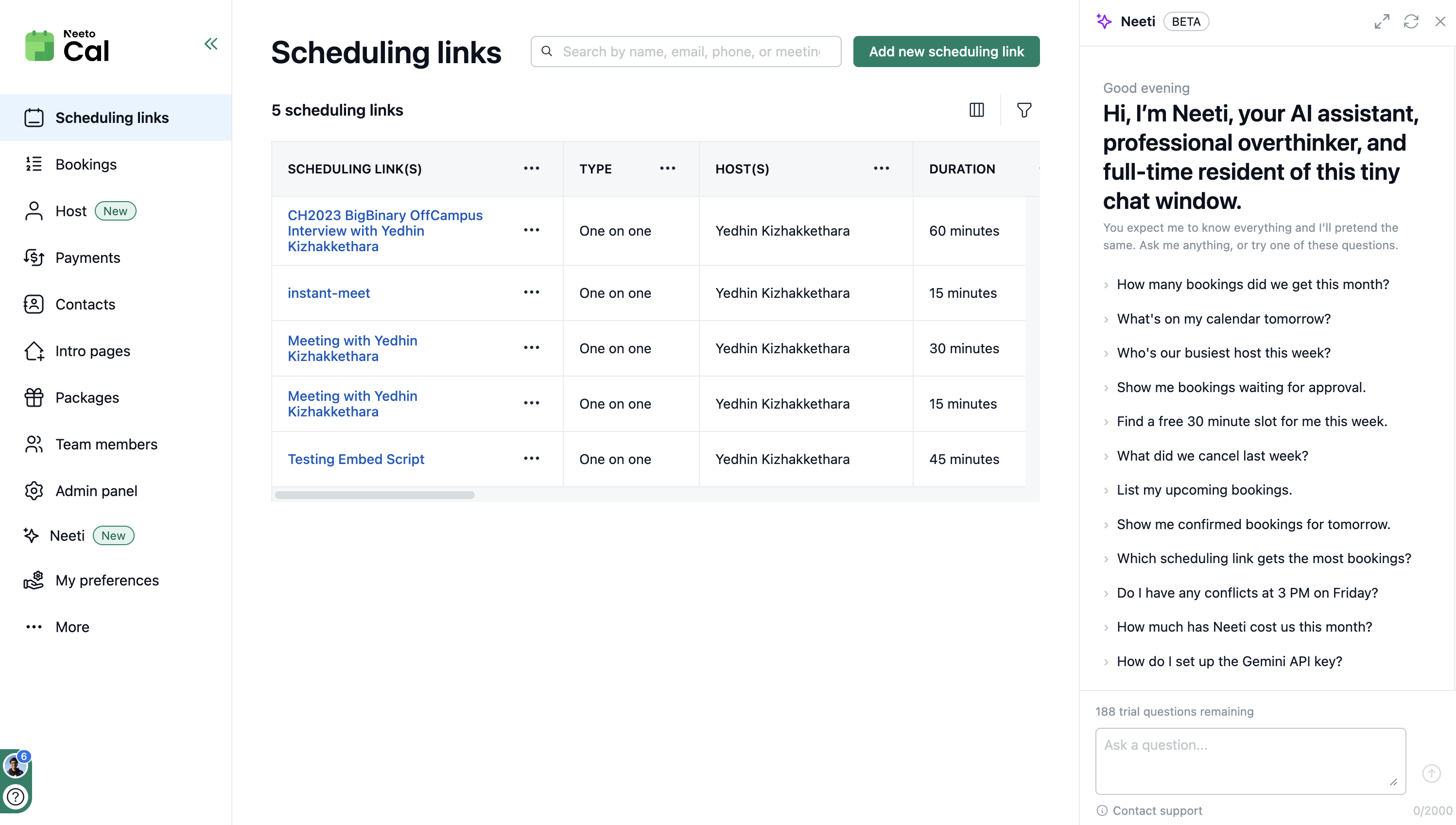
If you want to see what Neeti looks like in action, here's a quick walkthrough.
How Neeti works
Here's the one idea that shapes everything else: the AI model never touches our database.
That sounds backward, since the whole point is to answer questions about data that lives in a database. So here's what happens instead.
An AI model on its own is very good at predicting text, but it can't look anything up. It doesn't know how many bookings you have today any more than a stranger who has never seen your calendar does. To make it useful, you give it tools.
A tool is a small, pre-written function that the model is allowed to call. We wrote a handful of them for Neeti. We'll get into how these functions are written and wired up in the Under the hood section. For now, here's the short list:
count_bookings, to count bookings matching the filtering criteriafind_bookings, to fetch bookings matching the filtering criteriafind_available_slots, to find open time on a calendarcheck_booking_conflicts, to look for overlapssearch_hosts, to look up team members
There are more tools now for scheduling links, booking details, email templates, pending approvals, and so on. But you get the idea.
When Neeti needs to know something, it doesn't write a database query. It calls one of these tools. The tool runs a safe query that we wrote and reviewed, and hands back the result. The model reads that result and decides what to do next.
So a single question turns into a small loop:
Question:            "how many yoga bookings today?"

Neeti picks a tool:  count_bookings(meeting: "yoga", when: "today")
Tool returns:        62
Neeti writes:        "You have 62 yoga bookings today."
Sometimes it takes more than one step. "Is my morning free, and if not, who's booked" might call one tool to check for conflicts, read the answer, then call another to tool to look up the people involved. The model decides the order. Our job was to give Neeti good tools.
Under the hood
NeetoCal is a Ruby on Rails application, so the tools are Ruby classes. Each tool owns a small, reviewed ActiveRecord path. ActiveRecord is Rails' way of building database queries in Ruby. Gemini never writes SQL, and it never gets a database connection.
Here is a simplified version of count_bookings.
class Neeti::Tools::CountBookings < Neeti::Tools::Base
  description "Count bookings the caller can see."

  param :date_range, type: :object, required: false
  param :meeting_name_query, type: :string, required: false

  def execute(date_range: nil, meeting_name_query: nil)
    with_statement_timeout do
      scope = scoped_bookings

      if date_range
        from, to = resolve_range(date_range)
        scope = scope.where(starts_at: from..to)
      end

      if meeting_name_query.present?
        term = ActiveRecord::Base.sanitize_sql_like(
          meeting_name_query.downcase
        )

        matching_links = organization.meetings
          .where("LOWER(meetings.name) LIKE ?", "%#{term}%")
          .select(:id)

        scope = scope.where(meeting_id: matching_links)
      end

      { total: scope.count }
    end
  end
end
The real tool has more filters, status, host, grouping, timezone handling. The
important parts are in this smaller version. scoped_bookings applies the same
permission boundary NeetoCal uses elsewhere. with_statement_timeout keeps the
query from running forever. The return value is a Ruby hash, which becomes
structured data for the model to read.
The description and param lines are not just documentation for us. RubyLLM
uses them to describe the tool to Gemini: this is the tool name, this is what it
does, these are the arguments it accepts. When a turn starts, our
OrchestrationService loads every Ruby tool class, creates one instance of each
for the current organization and user, and passes them to the chat session:
chat.with_tools(*tools).
Gemini sees a menu of allowed functions. It calls count_bookings with a date
range and a meeting name. Rails receives that tool call, runs the Ruby method,
sends the structured result back to Gemini, and Gemini decides whether it has
enough information to answer or needs another tool.
The browser does not hold the whole conversation together by itself. When you
send a question, the controller saves the user message and queues
Neeti::ProcessMessageJob in Sidekiq, on a dedicated neeti queue. That worker
runs the tool loop.
As the turn moves forward, Rails broadcasts events over ActionCable: a tool
started, a tool finished, the answer completed, or something failed. Each event
carries a pubsub_token, so the React side-drawer can match events to the
question that caused them, even if another turn is also running.
We added two things on top, both about trust.
The first is that Neeti shows its work. Under every answer, there's a small trace you can expand to see exactly which tools ran and what they returned. If it tells you 62, you can open the trace and see the count that produced 62. No black box magic.
TODO add a screenshot showing the small trace and the expanded section
The second is that every tool is read-only. None of them can change, delete, or create anything. The only thing Neeti can do is read something and tell you about it.
A model writing raw queries is powerful, and on a bad day, that power points the wrong way: it reads something it shouldn't, or runs something heavy enough to slow the database for everyone. With a fixed set of read-only tools, the complete list of things Neeti can do is a list we can read on one screen. Fewer powers, easier to trust.
The yoga bookings
Back to the count that came out wrong.
To answer "how many yoga bookings today," the model reached for the wrong tool.
Instead of count_bookings, it used find_bookings, the one that fetches a
sample.
That tool is capped on purpose. If a customer has fifty thousand bookings, you
don't want a tool that drags all fifty thousand back, both because it's slow and
because it would bury the model in data. So find_bookings returns the first
page and stops. The first page had 23 rows. The model counted what it could see,
23, and reported it confidently, because from where it stood there was nothing
to suggest there was more.
The fix wasn't a cleverer prompt or a smarter model. It was a clearer set of tools.
We split two jobs that had quietly blurred together: "show me some bookings" and "count all the bookings." Those feel similar, but they aren't. A sample is allowed to be capped because you only need a few examples to look at. A count is never allowed to be capped, because a partial count is just a wrong number wearing the right outfit.
So the listing tools kept their caps, and the counting questions got their own path: one that runs a real total in the database and comes back uncapped.
Before:  find_bookings(...)   →  first 23 of who knows how many  →  "23"
After:   count_bookings(...)  →  62                              →  "62"
The same fix cleaned up a row of similar mistakes. "How many team members do I have" had been answering 50 when the real number was 57, for the same reason.
The lesson stuck with us. When an AI gets a fact wrong, the instinct is to blame the model, tweak the prompt, and reach for a bigger one. But often the model is reasoning fine over bad inputs. It answered the question it was actually able to answer, "how many of these can I see," not "how many exist." The bug wasn't in the model. It was in the tools we handed it.
Making it faster
The other thing we spent time on was the speed of response. Early on, answers were slow. Some took the better part of a minute, which is a long time to sit and watch a "thinking" dot blink.
Modern AI models have a setting for how much internal reasoning they do before they answer. In our code, that setting is:
THINKING_EFFORT = "low"

chat.with_thinking(effort: THINKING_EFFORT)
That is the "dial." Turning it up gives the model more room to think before it answers. In practice, that means more internal reasoning steps before it picks a tool or writes a reply. That helps for genuinely hard problems: multi-step logic, maths, tricky planning. We had it turned up, on the reasonable-sounding theory that more thinking means better answers.
But think about what Neeti actually does. Most of its work is looking things up. Count these, find those, check that calendar. That's retrieval, not deep reasoning. The hard part isn't the thinking, it's fetching the right rows, and the tools already handle that. We were paying for careful reasoning, the task never asked for.
So we set the thinking effort to low. That tells Gemini to spend fewer
internal reasoning steps before moving. Answers came back about a third faster,
and the quality didn't worsen, because the extra thinking had never been making
them more correct in the first place. It was just making them slower. Every
answer also costs real money in calls to the model, so leaner and faster was
cheaper too.
There was one more speed lesson. When Neeti answers a question, almost all of the elapsed time is spent waiting for the model to reply over the network, not working on our own database. That changes how you scale it. The bottleneck isn't database muscle, it's a lot of waiting, so the right move was to let many more answers run at the same time. They're mostly idle anyway, each one waiting on a reply.
The takeaway beneath it all: match the effort to the job.
Where Neeti fits in Neeto
NeetoCal is one product in a larger ecosystem Neeto where it has a few dozen products. Neeto has scheduling, help desk, chat, forms, knowledge bases, invoicing, project management and more. Different products, the same underlying shape of the problem. Our plan is to slowly roll out Neeti to all the Neeto products.
People use Neeto products and, in turn, create data. Then they have questions about that data, and the answers are usually a few clicks and filters away. Neeti makes the whole process simpler and exposes data for which fine grainer filter might not be there.
The useful part of Neeti isn't really the calendar-specific bits. It's the machinery around them. The loop that lets a model pick tools and read results. The read-only discipline. The visible trace. The honest split between sampling and counting. Swap NeetoCal's tools for a help desk's tools and most of that machine still stands. Build it carefully once, and the pattern travels.
That's the quiet promise here. Not one assistant for one product, but a shape for letting people talk to any of their data, safely, in plain language.
What's next
Right now, Neeti only reads. The obvious next step is letting it do things: "move my 3 pm to tomorrow," "cancel that and tell them why." That's a bigger jump than it sounds, because the moment an assistant can change your calendar, the cost of a wrong guess goes way up. Reads you can be relaxed about. Writes need to ask first. We'd rather get reading genuinely trustworthy before handing it the pen.
And the part we're most curious about is reach: taking the same machine and pointing it at the rest of the Neeto products, so the AI assistant in your help desk or your forms feel like the same helpful thing you met in your calendar.
The takeaway
When people picture building an AI feature, they picture clever prompts. Almost none of the work was there. It went into writing good tools, getting counts right, deciding what the model wasn't allowed to do, and turning a dial back down once we understood the job.
The prompt is the easy part. The plumbing is the product. A trustworthy assistant isn't the one with the cleverest wording behind it. It's the one that can only tell you true things, shows you how it got them, and doesn't make you wait.
A version of this post first appeared on my personal blog, with a few more personal notes.
Follow @bigbinary on X. Check out our full blog archive.